Contents
What is AEO?
AEO stands for 'Answer Engine Optimization'. It's about setting your website up so that AI tools like Claude, ChatGPT, Perplexity, Google's AI Overviews, and others – can actually read, understand, and quote your content when someone asks a question.
It's the same idea as SEO (Search Engine Optimisation), but for a different kind of search. SEO gets you ranked in a list of links. AEO gets you cited as the actual answer.
Why now? Until fairly recently, this wasn't really a thing to worry about – SEO covered it. But search behaviour has shifted fast. A growing amount of people now start their research in an AI chat instead of a traditional search bar, and Google's own results pages increasingly show an AI-generated summary above the usual links. If your site isn't structured in a way AI tools can parse with confidence, you won't show up in that summary, no matter how good the content underneath it is.
That's the gap AEO closes. And because it's still early, sites that get this right now have a real head start over the ones who wait until it's standard practice.
Here's what the process involves:
1. Add Google Search Console
This is the starting point, not because it directly improves AI visibility, but because it's how you find out when something's wrong. Search Console flags crawl errors, indexing issues, and – relevant here – any problems with your structured data. Without it, you're setting things up blind and won't know if something's broken until traffic drops.
If you don't already have it connected, this is a ten minute job and involves signing up for free, adding your domain name and then verifying it through your domain name provider using a txt file.
Note: If you're my client, I would have already set this up for you as part of my process.
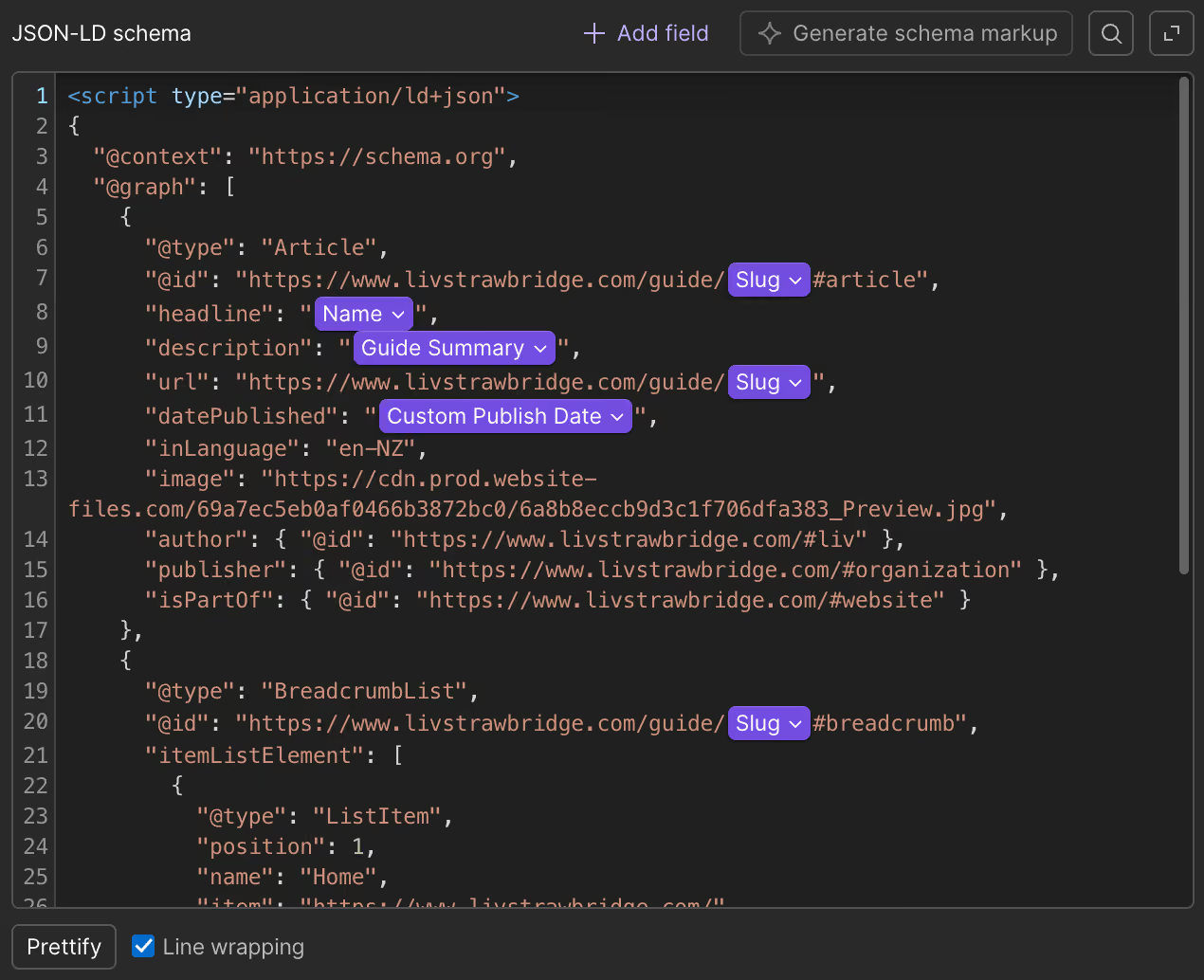
2. Add schema markup to your pages
Schema markup is structured data added to a page's code that explicitly tells search engines and AI tools what something is, eg. this is an article, this is a service, this is a person, this is an FAQ. Without it, AI has to guess at context from surrounding text. With it, there's no guessing involved.
This is the step that makes the biggest practical difference, and it's also the step I'd flag as the most fiddly. Static pages aren't too bad. But if your site runs on CMS-driven template pages – product pages, project pages, blog posts pulling from a collection – the schema needs to bind correctly to dynamic fields so each page outputs its own accurate data. Get the binding wrong and every page on that template inherits the same mistake. This is the part I'd recommend getting help with if you're not confident about connecting the dynamic fields in Webflow.
3. Test using the Schema Markup Validator
Once schema is in place, run your pages through Google's Schema Markup Validator. It'll tell you whether your Schema data is valid and being picked up correctly, or whether something needs fixing. It's a good idea to run this after any schema changes in the future, too.
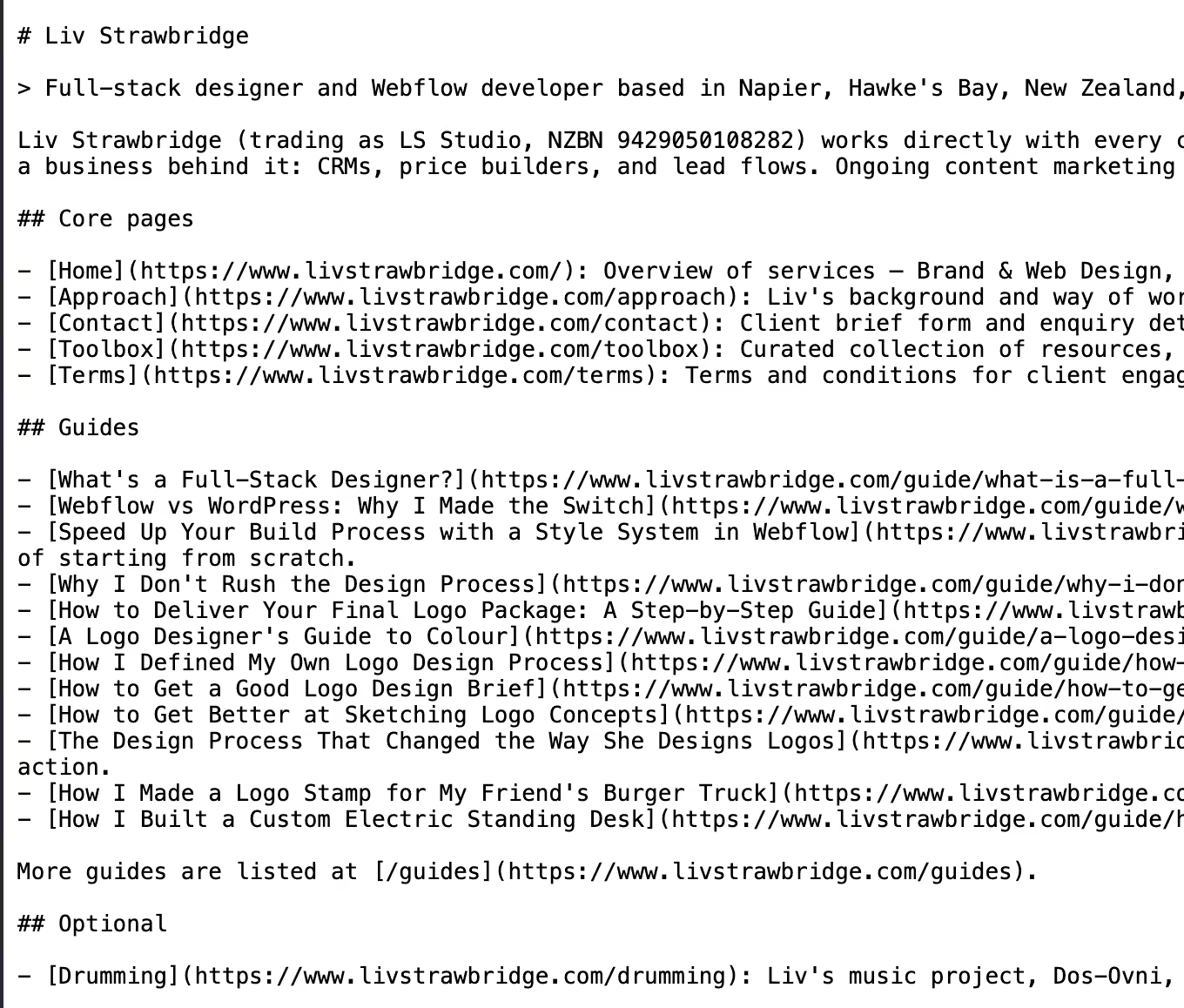
4. Add an llms.txt file
An llms.txt file is a simple text file that sits at your site's root and gives AI tools a clean, plain-language summary of what your site is and where the important pages live – a bit like a robots.txt file, but written for language models instead of search crawlers.
It's not going to single-handedly get you cited, but it gives AI tools a shortcut to understanding your site instead of having to infer everything from your page content alone.
5. Check that AI crawlers aren't blocked
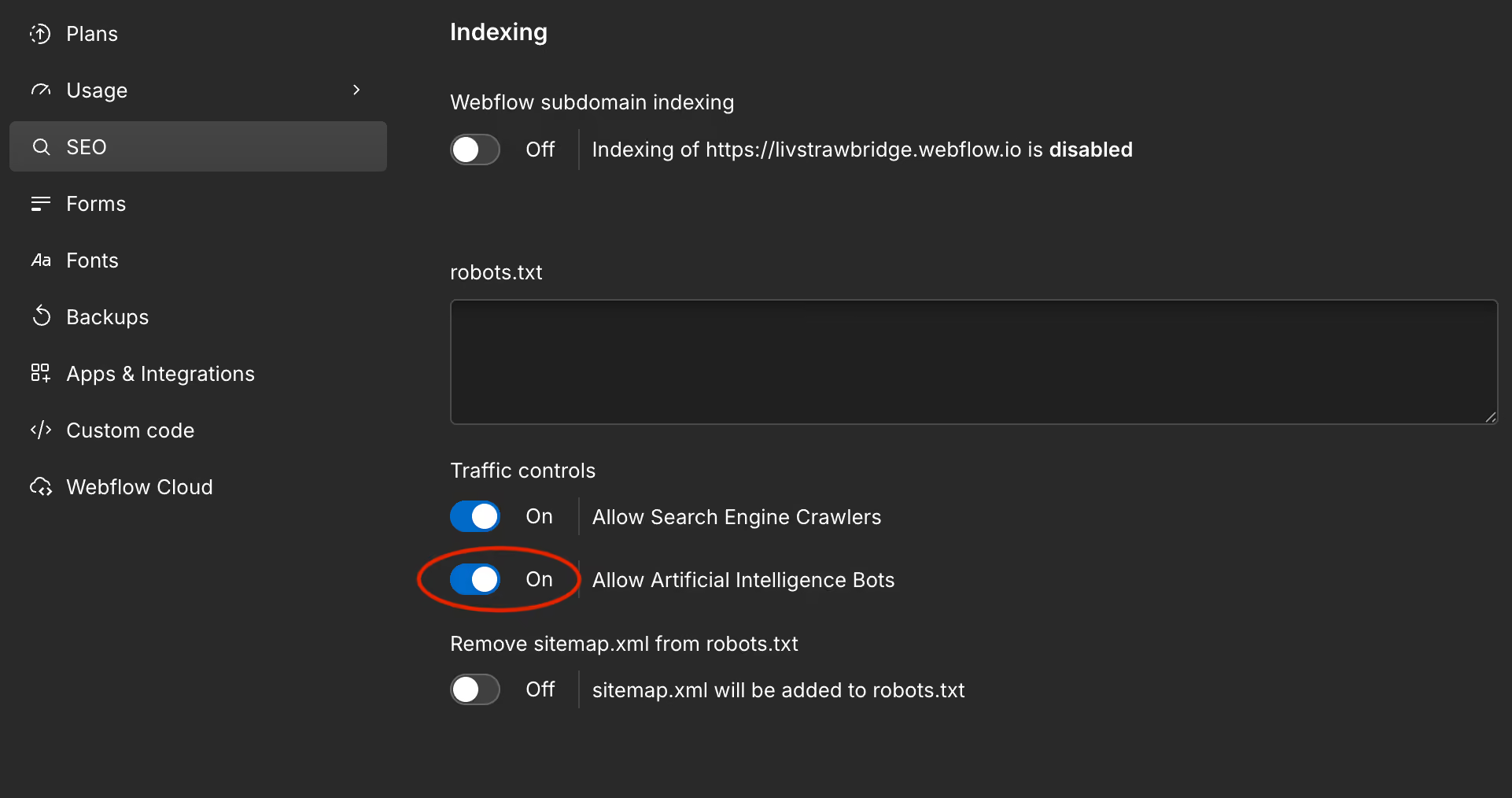
AI tools use their own crawlers to read sites. Most sites allow them by default, but it's worth checking your Webflow settings aren't blocking them, otherwise none of the structural work above gets seen at all.
Under your website settings in Webflow, go to the 'SEO' tab and ensure that 'Allow Artificial Intelligence Bots' is turned on.
Track what's growing
There are a couple of ways to check whether any of this is working. In incognito or temporary mode, ask your AI tool two things – "who's the best [service] in [your area]?" to see if you're being recommended to people who don't already know you, and "tell me about [your business]" to check the AI actually has accurate information about you. Neither is scientific, but both are quick ways to check your AI visibility.
For the fuller picture, you need analytics running. Google Search Console (from step one) tells you whether you're showing up in Google's results, and now in Google's AI Overviews too, but it won't show you clicks from AI tools, or what someone actually does once they land on your site. For that, you need Fathom, Google Analytics, or similar. If you've already got something in place, great. If not, I'd recommend Fathom Analytics – it's what I use and set up for my content growth clients, mainly because they find it a lot easier to read and understand than Google Analytics. Sign up through this link and you'll get $10 off.
Is this a one-off job?
Mostly, yes. Once Google Search Console is connected, your schema markup is in place, and your llms.txt file is live, the core setup is done – there's no ongoing work required just to keep it ticking over. In that sense it's a lot like SEO: there's an initial setup, and after that it just needs to stay accurate.
Where it comes back into play is content changes. If you update a page, add a new service, or rewrite your homepage down the track, that's the moment to also check your meta description and schema markup still match what's actually on the page. That's not really an AEO-specific step – it's the same thing you'd already do to keep your SEO accurate. AEO just adds a couple more things to that same checklist.
If you get through the checklist above and hit a wall, particularly on the schema side of template pages, I'm happy to help. Feel free to reach out.
Learn more
If you want to go deeper on any of this, Webflow University has some videos: